Dance studio management software without the patchwork.

ChoreoDesk is dance studio management software built to keep scheduling, students, attendance, credits, payments, and staff workflows in one connected system, so your team spends less time chasing details and more time running the studio.

Built specifically for dance studios that have outgrown spreadsheets, scattered messages, and disconnected tools.

Why studios start looking for something better

One small studio change should not create five admin tasks.

A student joins late. A class moves rooms. A teacher swaps times. A parent asks about credits. One small update turns into five separate checks across your calendar, attendance, payments, messages, and student notes.

That is where the time goes. Not into the work that grows the studio, but into making sure nothing was missed. The studio is busy, but it never feels fully under control.

What ChoreoDesk changes

One dance studio management system for the work that keeps your studio moving.

Built for the day-to-day reality of running a dance studio.

Scheduling, attendance, students, credits, payments, staff coordination, and studio setup stay connected.

  • Scheduling
  • Attendance
  • Students
  • Credits
  • Payments
  • Staff

The result is simple. Less cleanup. Fewer dropped details. More confidence in the way the studio runs day to day.

Features

Studio workflows that stay connected

Inside the workflow

Scheduling that drives the whole studio

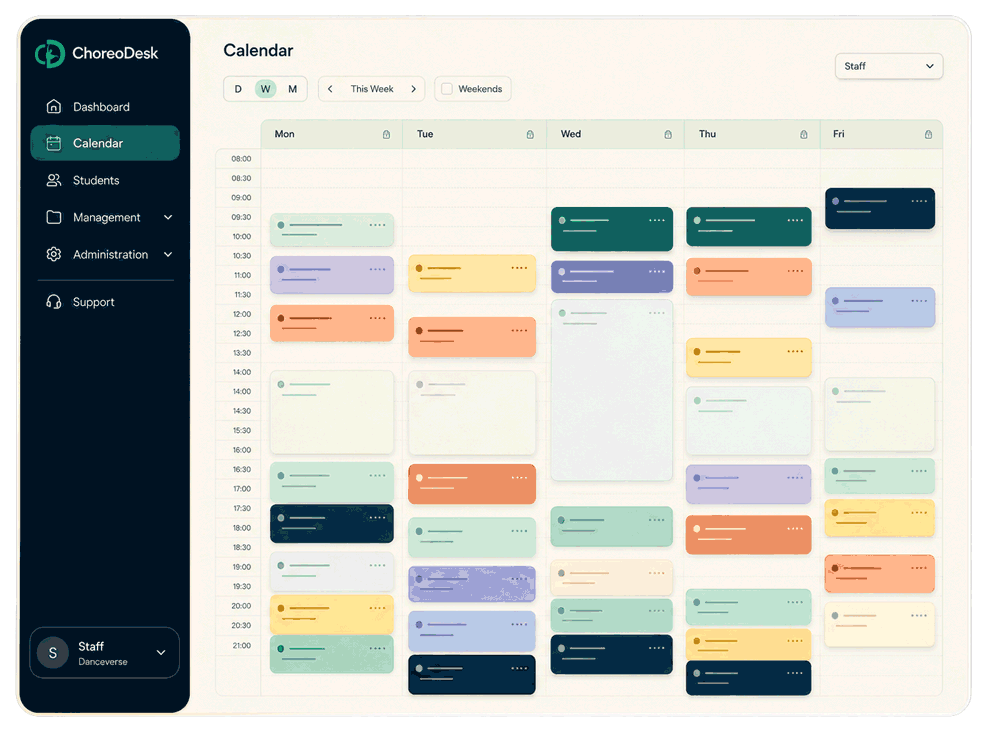
The calendar is where studio operations start, so ChoreoDesk treats it like the center of the workflow, not just a place to look at classes.

  • Daily, weekly and monthly views for daily planning
  • Rooms, staff, recurring events, and reschedules in one flow
  • Attendance and participant updates tied directly to events
  • Add different class types and mark unavailable times
Student records

Student, credit, and payment records together

When student records, attendance, credits, packages, and purchases are disconnected, every simple task takes longer than it should.

  • Student and guardian details stay close to the work
  • Attendance and subject assignments remain visible
  • Credit balances, packages, purchases, and receipts connect
  • Shared studio realities stay easier for staff to follow
Behind the scenes

Cleaner operations behind the scenes

Running a studio is also staff roles, setup, billing, forms, permissions, and all the small operational details that keep the business moving.

  • Staff roles and permissions stay structured
  • Studio setup and configuration are easier to manage
  • Questionnaires, submissions, and follow-up stay connected
  • Operational visibility comes back to the dashboard
Pricing

Simple pricing for dance studio software

Choose the plan that fits how your studio runs now. Annual billing keeps the monthly rate lower.

Founding studio offer: early customers can lock lower pricing for 12 months.

Starter

For solo teachers and small studios getting organized

29 EUR/month

Save with annual billing.

Billed annually: 348 EUR

Best for solo teachers and small owner-run studios that need scheduling, students, credits, payments, and the student portal in one place.

Compare what each plan includes

Start with the shared foundation, then compare what changes as plans grow.

StarterStudioPro
Included in every plan
Calendar and scheduling

Plan lessons and studio events on the calendar with staff, students, class types, subjects, rooms, and attendance connected to the same schedule.

IncludedIncludedIncluded
Attendance tracking

Mark attendance for scheduled classes and keep participation history connected to each student record.

IncludedIncludedIncluded
Student credits and balances

Track student credit balances, purchases, adjustments, cancellations, and usage as students attend classes.

IncludedIncludedIncluded
Payments and receipts

Record payments, issue receipts, manage payment history, and keep purchases connected to student credits and balances.

IncludedIncludedIncluded
Student portal

Give students their own portal to view schedules, balances, payments, and studio information without staff having to send every update manually.

IncludedIncludedIncluded
Stripe payments

Connect the studio Stripe account to accept online student payments, send payment requests, and handle Stripe-backed receipts and refunds.

IncludedIncludedIncluded
Email reminders and templates

Use studio email templates and reminders to send operational messages such as student portal invites and class-related communication.

IncludedIncludedIncluded
Direct developer support

Send support requests through the built-in ticketing system directly to the developer building ChoreoDesk.

IncludedIncludedIncluded
Basic dashboard widgets

Dashboard widgets for setup guidance, today’s events, weekly lessons, attendance follow-up, and system notices.

IncludedIncludedIncluded
Plan differences
Students

Store student profiles, contacts, status, subjects, balances, purchases, and activity in one place.

Included75Included300Included
Class types

Define the lesson or event types your studio sells and schedules, including the credit categories used by packages and student balances.

Included2Included4Included4
Subjects

Organize classes by dance style or subject and assign those subjects to students, staff, and events.

Included10Included20Included
Packages

Create packages students can purchase, with prices, included credits, validity, receipts, and purchase history.

Included5Included20Included
Staff

Manage the people who work in the studio, assign roles such as teacher or manager, and control what they can access.

Not includedIncluded5Included
Rooms

Create rooms and use them in scheduling so classes can be assigned to physical studio spaces.

Not includedIncluded2Included
Questionnaires

Build questionnaires, collect student submissions, and keep form answers connected to the student record.

Not includedIncluded5Included
Google Calendar sync

Connect account Google Calendar so studio events can be synchronized with an external calendar.

Not includedIncludedIncluded
Installment plans

Create installment plans for student purchases so payments and included credits can be split over a schedule.

Not includedIncludedIncluded
Couples

Manage couple student records with shared subjects and member details for partner-based dance workflows.

Not includedIncludedIncluded
Attendance report

Review attendance across classes and students so the studio can follow participation and missed lessons.

Not includedIncludedIncluded
Credit history report

Use the credit history report to track credit changes, purchases, adjustments, cancellations, and balance history for students.

Not includedIncludedIncluded
Payment transactions report

Use the payment transactions report to review payments, payment methods, receipts, refunds, and purchase details.

Not includedIncludedIncluded
Workload report

Use the workload report to see staff workload by period, class type, subject, classes, and attendance.

Not includedIncludedIncluded
More dashboard widgets

Additional dashboard widgets for birthdays, weekly income, and student growth.

Not includedIncludedIncluded
StarterStudioPro

Included in every plan

Calendar and scheduling

Plan lessons and studio events on the calendar with staff, students, class types, subjects, rooms, and attendance connected to the same schedule.

Included
Included
Included
Attendance tracking

Mark attendance for scheduled classes and keep participation history connected to each student record.

Included
Included
Included
Student credits and balances

Track student credit balances, purchases, adjustments, cancellations, and usage as students attend classes.

Included
Included
Included
Payments and receipts

Record payments, issue receipts, manage payment history, and keep purchases connected to student credits and balances.

Included
Included
Included
Student portal

Give students their own portal to view schedules, balances, payments, and studio information without staff having to send every update manually.

Included
Included
Included
Stripe payments

Connect the studio Stripe account to accept online student payments, send payment requests, and handle Stripe-backed receipts and refunds.

Included
Included
Included
Email reminders and templates

Use studio email templates and reminders to send operational messages such as student portal invites and class-related communication.

Included
Included
Included
Direct developer support

Send support requests through the built-in ticketing system directly to the developer building ChoreoDesk.

Included
Included
Included
Basic dashboard widgets

Dashboard widgets for setup guidance, today’s events, weekly lessons, attendance follow-up, and system notices.

Included
Included
Included

Plan differences

Students

Store student profiles, contacts, status, subjects, balances, purchases, and activity in one place.

Included75
Included300
Included
Class types

Define the lesson or event types your studio sells and schedules, including the credit categories used by packages and student balances.

Included2
Included4
Included4
Subjects

Organize classes by dance style or subject and assign those subjects to students, staff, and events.

Included10
Included20
Included
Packages

Create packages students can purchase, with prices, included credits, validity, receipts, and purchase history.

Included5
Included20
Included
Staff

Manage the people who work in the studio, assign roles such as teacher or manager, and control what they can access.

Not included
Included5
Included
Rooms

Create rooms and use them in scheduling so classes can be assigned to physical studio spaces.

Not included
Included2
Included
Questionnaires

Build questionnaires, collect student submissions, and keep form answers connected to the student record.

Not included
Included5
Included
Google Calendar sync

Connect account Google Calendar so studio events can be synchronized with an external calendar.

Not included
Included
Included
Installment plans

Create installment plans for student purchases so payments and included credits can be split over a schedule.

Not included
Included
Included
Couples

Manage couple student records with shared subjects and member details for partner-based dance workflows.

Not included
Included
Included
Attendance report

Review attendance across classes and students so the studio can follow participation and missed lessons.

Not included
Included
Included
Credit history report

Use the credit history report to track credit changes, purchases, adjustments, cancellations, and balance history for students.

Not included
Included
Included
Payment transactions report

Use the payment transactions report to review payments, payment methods, receipts, refunds, and purchase details.

Not included
Included
Included
Workload report

Use the workload report to see staff workload by period, class type, subject, classes, and attendance.

Not included
Included
Included
More dashboard widgets

Additional dashboard widgets for birthdays, weekly income, and student growth.

Not included
Included
Included
Questions studios ask

Frequently Asked Questions

Who is ChoreoDesk for?

ChoreoDesk is built for dance studio owners, managers, and teams who need a better way to handle scheduling, students, attendance, credits, payments, staff, and day-to-day studio operations.

Is ChoreoDesk only for large studios?

No. It is useful for any dance studio that feels the pain of scattered systems, manual admin, and too much operational work living in too many places.

Is the calendar the main feature?

The calendar is one of the strongest parts of ChoreoDesk, but it matters because it connects to the rest of the workflow. Scheduling, attendance, students, credits, purchases, and staff actions all work better when they are tied together.

Can I manage student credits and packages in ChoreoDesk?

Yes. ChoreoDesk supports credit tracking, package purchases, manual adjustments, purchase history, and receipt-related workflows.

Does ChoreoDesk handle payments and receipts?

Yes. ChoreoDesk includes cash and card purchase flows, Stripe-related payment handling, and receipt generation so payment-related work stays connected to the rest of the studio workflow.

Can my staff use it too?

Yes. ChoreoDesk includes staff roles and permissions for owners, managers, and teachers, so the right people can access the right parts of the system.

Do students get portal access?

Yes. ChoreoDesk includes a lighter student portal where students can view balances, credit history, upcoming bookings, and eligible receipts.

Is ChoreoDesk generic class management software?

The main focus of ChoreoDesk is dance studios, but the system can also be adapted for other places that need to manage classes, students, payments, and staff.

How do I get started?

Open the inquiry form, tell us a bit about your studio, and we will get back to you soon.

Can I bring existing student data into ChoreoDesk?

Yes. If your current student data is in spreadsheets or another system, we can review it during the demo and help plan what should be imported or set up first.

How long does setup take?

Setup depends on the size of your studio and how your data is organized. The usual starting point is to set up class types, subjects, staff, packages, students, and the schedule, then add payments and student portal workflows.

What kind of support is included?

Every plan includes direct support through the built-in ticketing system. Support requests go directly to the developer building ChoreoDesk.

Is ChoreoDesk already used with studios?

Yes. Dance studios already use ChoreoDesk. During a demo, we can show the main principles and typical examples of how the system helps organize studio work.


If your current tools can no longer keep up with your studio’s growth, we’ll show you a clearer way to run it.

We will walk you through the product, answer your questions, and show you how ChoreoDesk handles the workflows that usually get split across too many places.

No pressure. Just a clear look at the product and whether it makes sense for your studio.